An alternative Telagram: how to run its own Mathx server using Docker Compose

Precondition:
Over the past few years, more and more people have started thinking about how safe it is to entrust all of their correspondence, contacts, and digital communication to a large centralized platform. This is not only about privacy in the abstract. It is also about the feeling that your data really belongs to you: that you control the infrastructure yourself, decide where everything is stored, and do not depend entirely on someone else’s rules, restrictions, or sudden service policy changes.
This is where Matrix comes in — an open federated protocol for real-time communication. It is not just one service, and it is not just one website. Matrix is a network of independent servers that can communicate with each other. Unlike traditional messengers, where everything is tied to a single company, Matrix does not have one central authority that controls the entire system.
Each server is called a homeserver. It can register users, store messages, rooms, media files, and account data. At the same time, users from different homeservers can still communicate with each other within one federated network. This is the main idea behind Matrix: you can own your infrastructure without losing access to global communication.
This approach is especially useful for people who value privacy, want more control over their data, and do not want to build critical communication on top of someone else’s closed platform. Matrix does not promise magic or complete simplicity out of the box. Instead, it gives something much more important: freedom, transparency, and the ability to rely on your own infrastructure first.
This guide is for those who are already generally familiar with Linux, DNS, and Docker, but want to go all the way from scratch: carefully, consistently, and without skipping important details. As a result, you will be able to run your own Matrix server and better understand how federated communication works in practice.
So what happens is
Once this setup is complete, you will have:
- your own Matrix server running on home hardware;
- working federation;
- voice and video call support for Element X / Element Call;
- the ability to register users through Synapse Admin;
- an independent foundation for personal, family, or team communication.
What to prepare in advance:
1. Static Public IP Address
Check your provider’s personal account page or support service to see whether a static public IP address is available. Many providers offer it as a separate paid option.
2. Domain Name
Prepare a domain name in advance. There is no practical way around this. The domain itself is usually inexpensive, but with renewals and additional services, the total yearly cost may be higher than the base price.
3. Old Internet connection server
It is best to connect the server to the router using a wired RJ-45 connection. Also check the local IP address of the server in your home network, for example:
192.168.0.172
4. SSH Access Server
For running Matrix, almost any computer can work, including an old laptop or a compact home server.
Recommended:
- it is better to use Ubuntu Server or another Debian-based distribution;
- Windows is not recommended for this scenario;
- access to the server should preferably be configured via SSH.
Example connection:
ssh user@server_ip
5. Docker and Docker Compose
Docker and Docker Compose must be installed on the server. For this scenario, this is one of the most convenient ways to deploy the Matrix stack.
Note: this guide assumes that you already have a working Nginx Proxy Manager.
Step 1. Cloudflare DNS Configuration
1.1. NS domain records
In your domain control panel, specify the Cloudflare NS servers issued for your zone.
The settings usually look like this:
- Type: NS
- Name: @
- Content: NS servers issued by Cloudflare
- TTL: Auto
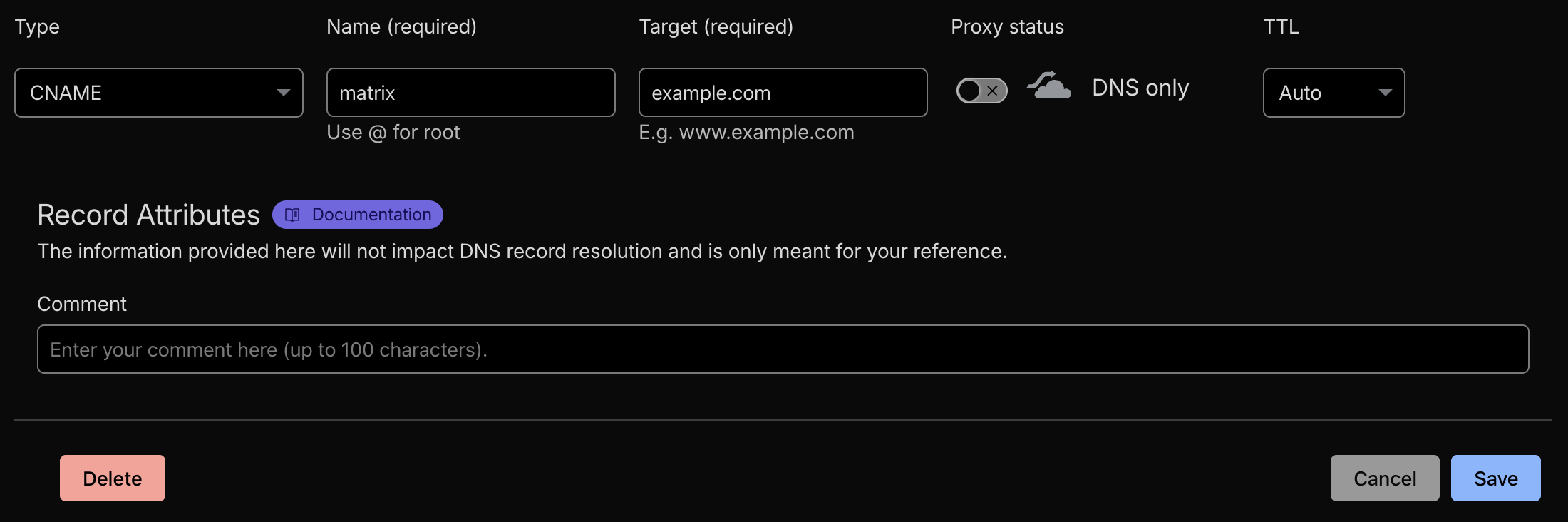
1.2. CNAME record for Matrix
Create a CNAME record:
- Type: CNAME
- Name: matrix
- Target: example.com — your domain
- Proxy status: DNS only
- TTL: Auto
This record is required for the main Matrix host:
matrix.example.com
This is the address Matrix clients will connect to.
1.3. DNS record for the calling service
Create an A record:
- Type: A
- Name: matrixrtc
- IPv4:
- Proxy status: DNS only
- TTL: Auto
This record is required for the calling service.
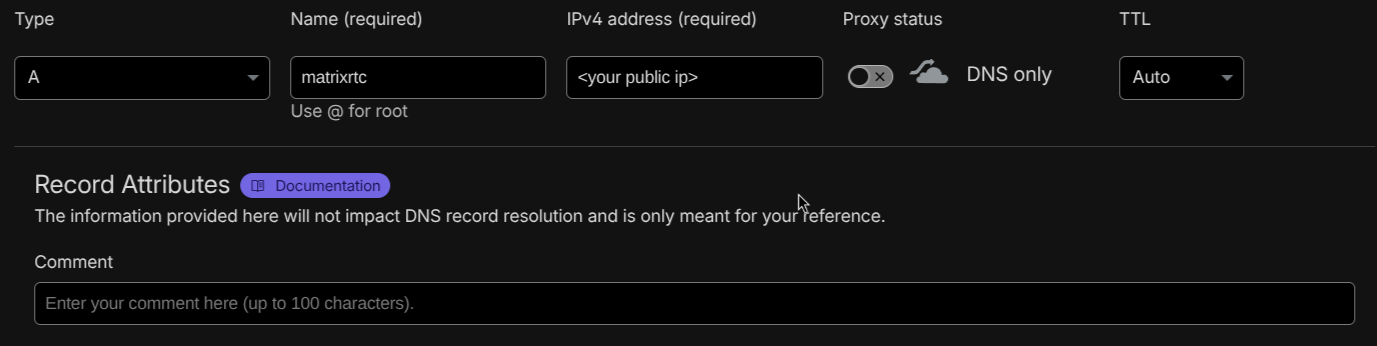
For this service, it is usually important to use DNS only, because proxying it through Cloudflare can break some Matrix components and calling services.
Step 2. Nginx Proxy Manager Configuration
In this configuration, you will need two proxy hosts:
- matrix.example.com
- matrixrtc.example.com
2.1. Proxy Host for matrix.example.com
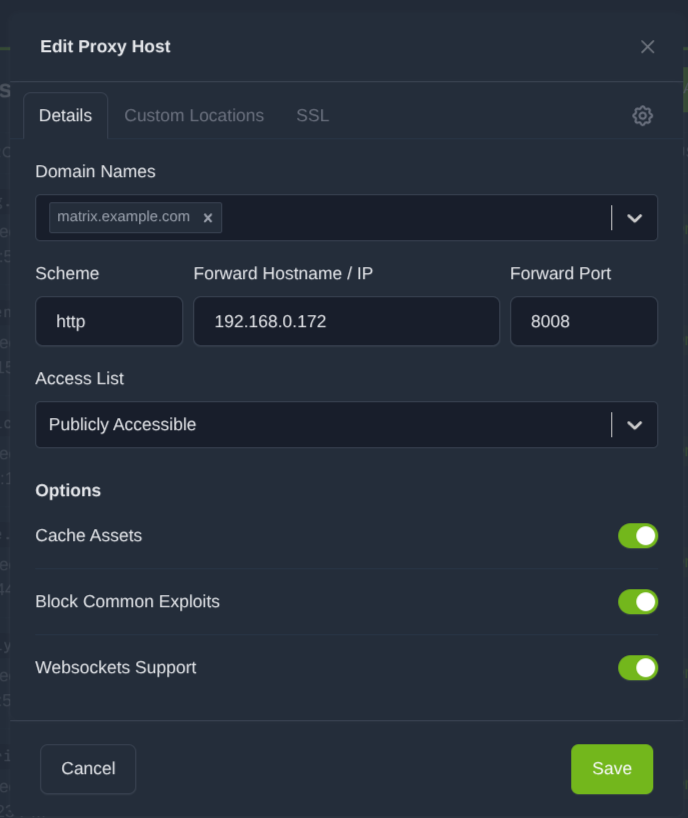
In the Details tab, specify:
- Domain Names: matrix.example.com
- Scheme: http
- Forward Hostname / IP: local IP address of the server, for example 192.168.0.172
- Forward Port: 8008
- Access List: Publicly Accessible
- Cache Assets: ON
- Block Common Exploits: ON
- Websockets Support: ON
In the Custom Locations tab, add two locations.
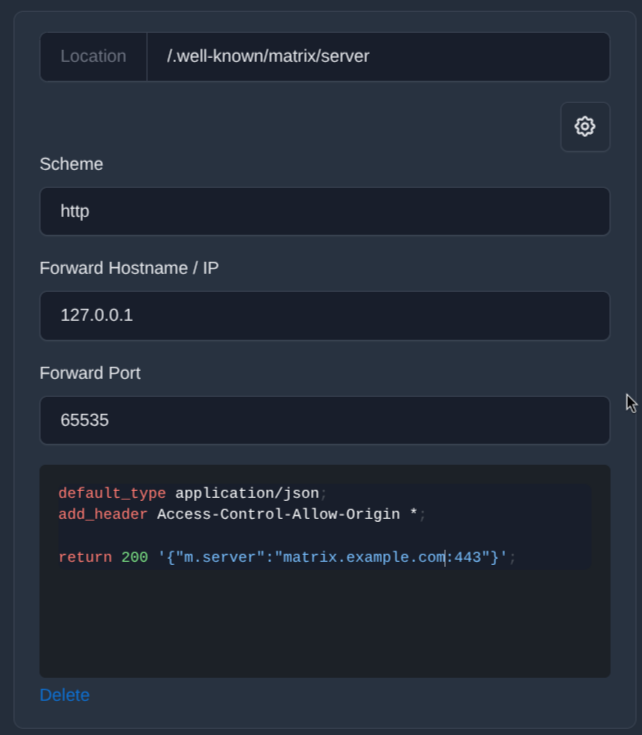
Location 1:/.well-known/matrix/server
Options:
- Scheme: http
- Forward Hostname / IP: 127.0.0.1
- Forward Port: 65535
In the Custom Nginx Configuration field, insert:
default_type application/json;
add_header Access-Control-Allow-Origin *;

return 200 '{"m.server":"matrix.example.com:443"}';
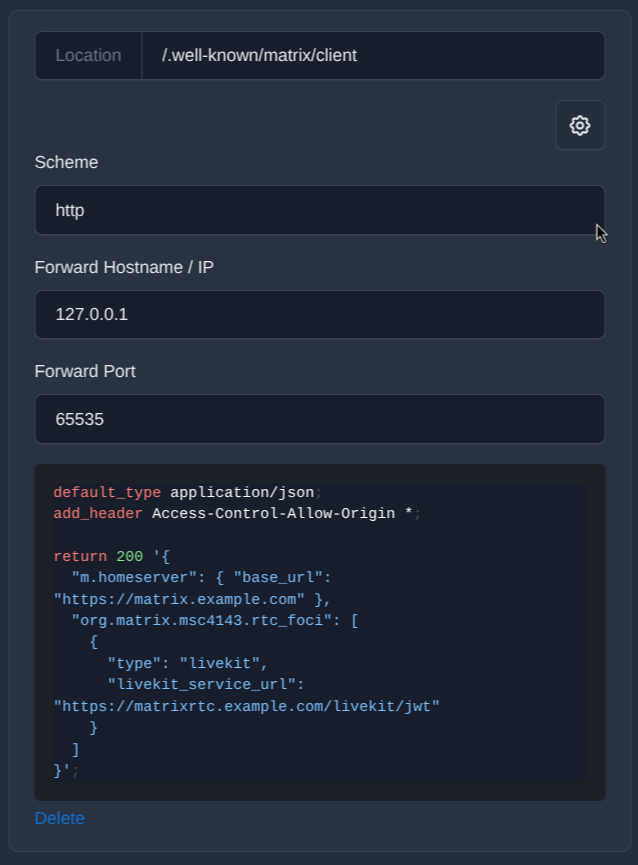
Location 2:/.well-known/matrix/client
Options:
- Scheme: http
- Forward Hostname / IP: 127.0.0.1
- Forward Port: 65535
In the Custom Nginx Configuration field, insert:
default_type application/json;
add_header Access-Control-Allow-Origin *;

return 200 '{
  "m.homeserver": { "base_url": "https://matrix.example.com" },
  "org.matrix.msc4143.rtc_foci": [
    {
      "type": "livekit",
      "livekit_service_url": "https://matrixrtc.example.com/livekit/jwt"
    }
  ]
}';
These addresses are used for the following:
/.well-known/matrix/serverreports the feds at which your server is available;/.well-known/matrix/clienttells the Matrixclients which homeerver use and where the phone service is placed.
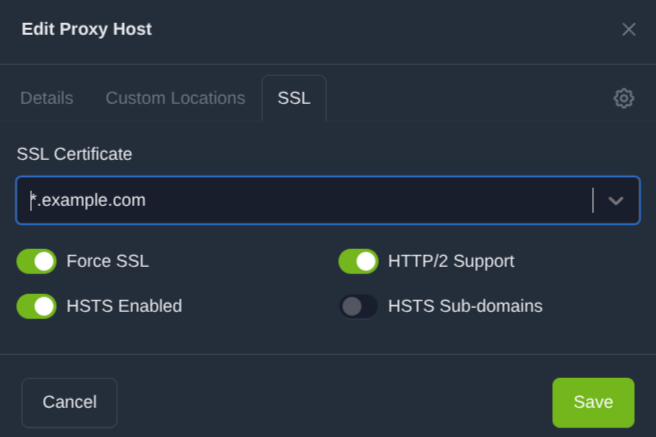
In the SSL tab, enable:
- certificate: wildcard certificate or certificate for your domain, for example *.example.com
- Force SSL: ON
- HTTP/2 Support: ON
- HSTS Enabled: ON
- HSTS Subdomains: OFF
2.2. Proxy Host for matrixrtc.example.com
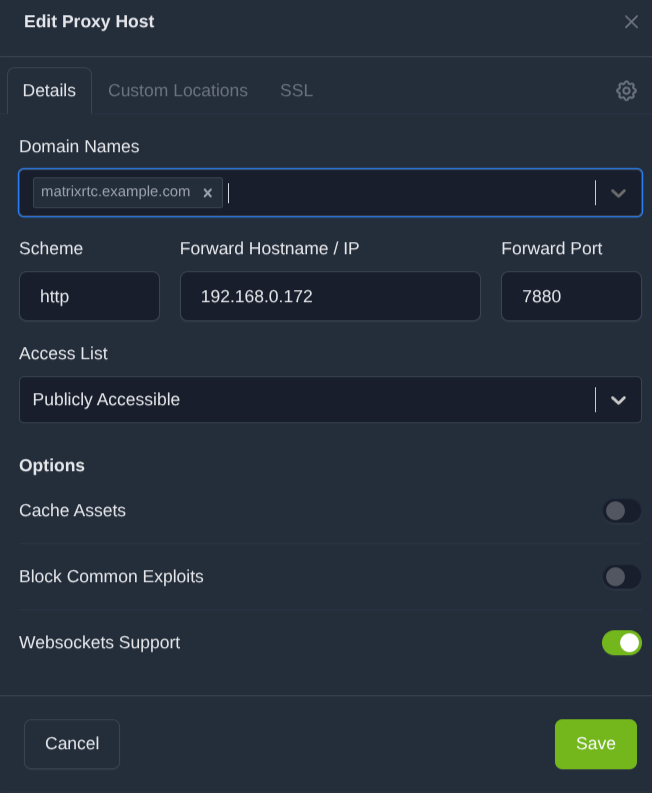
In the Details tab, specify:
- Domain Names: matrixrtc.example.com
- Scheme: http
- Forward Hostname / IP: local IP address of the server, for example 192.168.0.172
- Forward Port: 7880
- Access List: Publicly Accessible
- Websockets Support: ON
- Cache Assets: OFF
- Block Common Exploits: OFF
For matrixrtc, no additional Custom Locations are required.
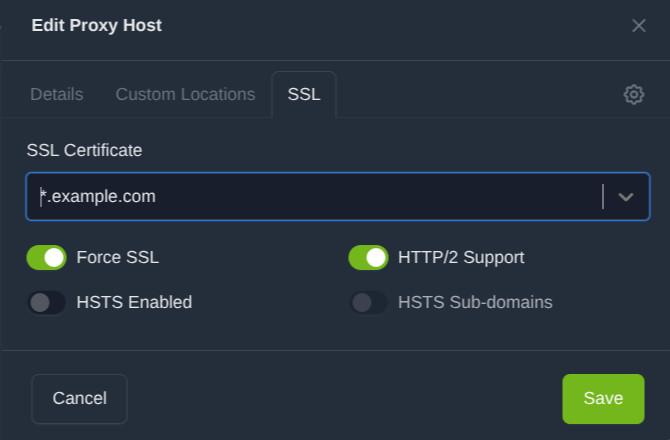
In the SSL tab, enable:
- certificate: *.example.com
- Force SSL: ON
- HTTP/2 Support: ON
- HSTS Enabled: OFF
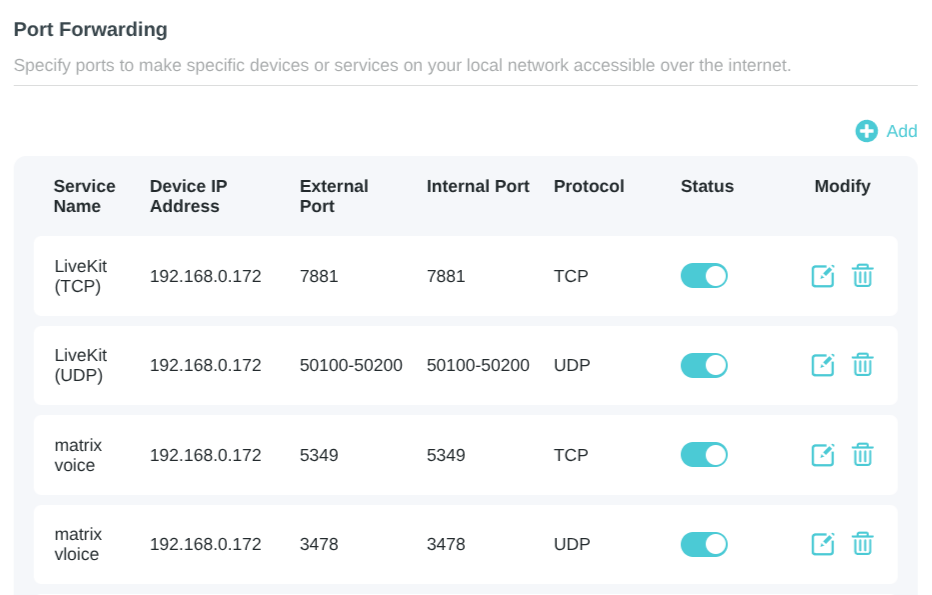
Step 3. Forward ports on the router
You need to open and forward the required ports on your router to the local IP address of the server.
The following rules are used in this example:
- 7881/TCP > 192.168.0.172:7881 — LiveKit
- 50100-50200/UDP > 192.168.0.172:50100-50200 — LiveKit media traffic
- 5349/TCP > 192.168.0.172:5349 — TURN over TLS
- 3478/UDP > 192.168.0.172:3478 — TURN
It is important to understand that each router has its own interface, but the general principle is the same: the external port must be forwarded to the internal address and port of your server.
Step 4. Starting Matrix
First, clone the Docker Compose configuration from the GitHub repository:
git clone [email protected]:inne-dev/matrix-server.git
Then go to the project folder:
cd matrix-server
Use the environment variable template for a quick start:
cp .env.example .env
Then open the .env file and set:
- MATRIX_DOMAIN
- secrets with sufficiently strong values:
- POSTGRES_PASSWORD
- SYNAPSE_*_SECRET
- TURN_PASSWORD
- LIVEKIT_SECRET
Then generate the configuration:
./scripts/render-configs.sh
After the configuration has been created, start the services:
docker compose up -d
To check the state of the containers, use:
docker compose ps
docker compose logs --tail=100 synapse
Step 5. Create first user
When the stack is running, create the first user using the built-in Synapse utility from inside the container:
docker exec -it synapse register_new_matrix_user \
  -c /data/homeserver.yaml \
  http://localhost:8008
Then, in interactive mode, the wizard will ask for:
- username;
- password;
- whether this user should have admin privileges.
Step 6. Client
You can use:
- on mobile — Element X
- on desktop — Element Desktop
Specify your own homeserver when logging in, for example:
https://matrix.example.com
After that, you can sign in to your account, connect to the server, and start using your own Matrix infrastructure.
For whom this guide is
This material will be useful if you are looking for:
- a secure messenger for personal use;
- an open messenger for a team or community;
- a way to run your own messenger on a home server;
- a solution that is less dependent on one company;
- a more private and controlled way of communication.
Summary
In the end, you get your own independent communication system. This server can be used for personal communication, family, small teams, closed communities, or technical projects where control over infrastructure, autonomy, and predictability are important.
The main advantage of Matrix is that it is not a centralized messenger fully tied to a single operator. It is an open federated network where you can deploy your own homeserver, manage users, connect clients, and, if necessary, extend the system with additional services.
If you want your own messenger on a home server, or simply a more independent way to stay connected, Matrix looks like one of the most powerful options. Yes, this approach has a higher entry threshold: you need to deal with DNS, certificates, reverse proxying, port forwarding, and basic container configuration. But in return, you get a level of flexibility, independence, and control that regular consumer messengers usually do not provide.
Frequently asked questions
Is it hard to set up your own Matrix server?
The basic Matrix setup is not too complicated if you are already familiar with Linux, Docker, DNS, and reverse proxying. The main difficulty is usually not Synapse itself, but the correct configuration of the domain, TLS certificates, federation, and calling services.
Can I use Matrix for a family or a small team?
Yes. Matrix works well for personal communication, small teams, family chats, closed communities, or technical projects where autonomy, control, and predictability are important.
Do I have to run the server at home?
No. You can deploy Matrix on a home server, on a VPS, or on another rented infrastructure. A home server is only one possible option if you want maximum control over your own system.
Will Matrix replace normal popular messengers?
For many scenarios, yes, especially if independence, privacy, and control over infrastructure are important to you. But it is worth keeping in mind that Matrix requires a little more technical preparation and does not always provide the same level of simplicity as mass-market consumer messengers.
Leave a comment